JavaScript Basics
Author : M.Fauzan Arrafi

Introduction
JavaScript is an immensely popular and versatile programming language primarily used for web development. Its ability to add dynamic and interactive behavior to web pages has made it a cornerstone of modern web development. In this comprehensive tutorial, we will delve into the fundamentals of JavaScript, equipping you with the knowledge to create powerful and engaging web applications.
JavaScript, often abbreviated as JS, was created by Brendan Eich in 1995 with the primary purpose of enhancing user experience on the web. It is a high-level, interpreted programming language that runs directly in the browser, enabling client-side scripting. Over time, JavaScript has evolved to become a multi-paradigm language, supporting imperative, functional, and object-oriented programming styles.
JavaScript empowers web developers to build dynamic and interactive web pages that respond to user actions in real-time. With JavaScript, you can manipulate the Document Object Model (DOM) to modify HTML elements, change styles, handle events, validate form inputs, perform calculations, and fetch data from servers asynchronously. The possibilities are virtually limitless.
Basic Syntax
Understanding the basic syntax of JavaScript is crucial for writing effective code. We’ll explore the structure of JavaScript programs, including variable declaration, operators, functions, conditionals, and loops. You will learn about JavaScript’s built-in data types, such as numbers, strings, booleans, arrays, objects, null, and undefined. We’ll cover how to work with these data types and perform operations on them.
JavaScript code is usually embedded within HTML documents using <script> tags. Alternatively, it can be written in separate .js files and linked to HTML documents.
// Example of a basic JavaScript function
function greet(name) {
  console.log("Hello, " + name + "!");
}
Data Types
JavaScript supports various data types, including:
- Number: Represents numeric values.
- String: Represents textual data.
- Boolean: Represents either
trueorfalse. - Array: Represents an ordered collection of values.
- Object: Represents a collection of key-value pairs.
- Null: Represents the absence of any value.
- Undefined: Represents an uninitialized variable.
Control Structures
JavaScript provides powerful control structures to handle program flow and execute code based on specific conditions.
Conditional Statements
Conditional statements allow you to execute different code blocks based on specific conditions. JavaScript provides the following conditional statements:
- if statement: The
ifstatement allows you to execute a block of code if a certain condition is true.
if (condition) {
  // Code to be executed if the condition is true
}
- else statement: The
elsestatement is used in conjunction with theifstatement and allows you to specify a block of code to be executed if the condition is false.
if (condition) {
  // Code to be executed if the condition is true
} else {
  // Code to be executed if the condition is false
}
- else if statement: The
else ifstatement allows you to check additional conditions if the previous conditions are false. This statement can be chained multiple times.
if (condition1) {
  // Code to be executed if condition1 is true
} else if (condition2) {
  // Code to be executed if condition1 is false and condition2 is true
} else {
  // Code to be executed if both condition1 and condition2 are false
}
Loops
Loops enable you to repeat a block of code multiple times until a specific condition is met. JavaScript provides the following loop structures:
- for loop: The
forloop is used when you know beforehand the number of iterations you want to perform.
for (initialization; condition; iteration) {
  // Code to be executed in each iteration
}
- while loop: The
whileloop is used when the number of iterations is not known beforehand but depends on a specific condition.
while (condition) {
  // Code to be executed while the condition is true
}
- do-while loop: The
do-whileloop is similar to thewhileloop, but it guarantees that the block of code is executed at least once before checking the condition.
do {
  // Code to be executed at least once
} while (condition);
These control structures provide flexibility and control over the flow of your JavaScript programs. By utilizing conditional statements and loops effectively, you can create dynamic and responsive applications.
Functions
Functions are reusable blocks of code that perform specific tasks. They can accept parameters and return values.
// Function with default parameters
function greet(name = "Anonymous") {
  console.log("Hello, " + name + "!");
}

greet(); // Output: Hello, Anonymous!
greet("John"); // Output: Hello, John!
In this example, the greet function has a default parameter for name set to “Anonymous”. If no argument is provided, it will use the default value.
Anonymous Function
// Anonymous function assigned to a variable
const sayHello = function() {
  console.log("Hello!");
};

sayHello(); // Output: Hello!
Anonymous functions are functions without a name. They can be assigned to variables and invoked just like named functions.
Arrow Function
// Arrow function
const multiply = (a, b) => a * b;

console.log(multiply(2, 3)); // Output: 6
Arrow functions provide a concise syntax for writing functions. They are especially useful for writing one-liner functions.
Higher-Order Function
// Higher-order function
function calculate(operation, a, b) {
  return operation(a, b);
}

function add(a, b) {
  return a + b;
}

console.log(calculate(add, 2, 3)); // Output: 5
Higher-order functions are functions that accept other functions as arguments or return functions as results. In this example, calculate is a higher-order function that takes an operation function as a parameter.
Recursive Function
// Recursive function to calculate factorial
function factorial(n) {
  if (n === 0) {
    return 1;
  }
  return n * factorial(n - 1);
}

console.log(factorial(5)); // Output: 120
Recursive functions are functions that call themselves. In this example, the factorial function calculates the factorial of a number using recursion.
These are just a few variations and types of functions in JavaScript. Functions are incredibly powerful and versatile, allowing you to write modular and reusable code.
DOM Manipulation
JavaScript’s integration with the Document Object Model (DOM) enables you to manipulate and interact with HTML elements dynamically. We’ll cover how to select and modify elements, create new elements, handle events, and traverse the DOM tree. You’ll gain the skills to create interactive forms, build responsive menus, and implement smooth animations.
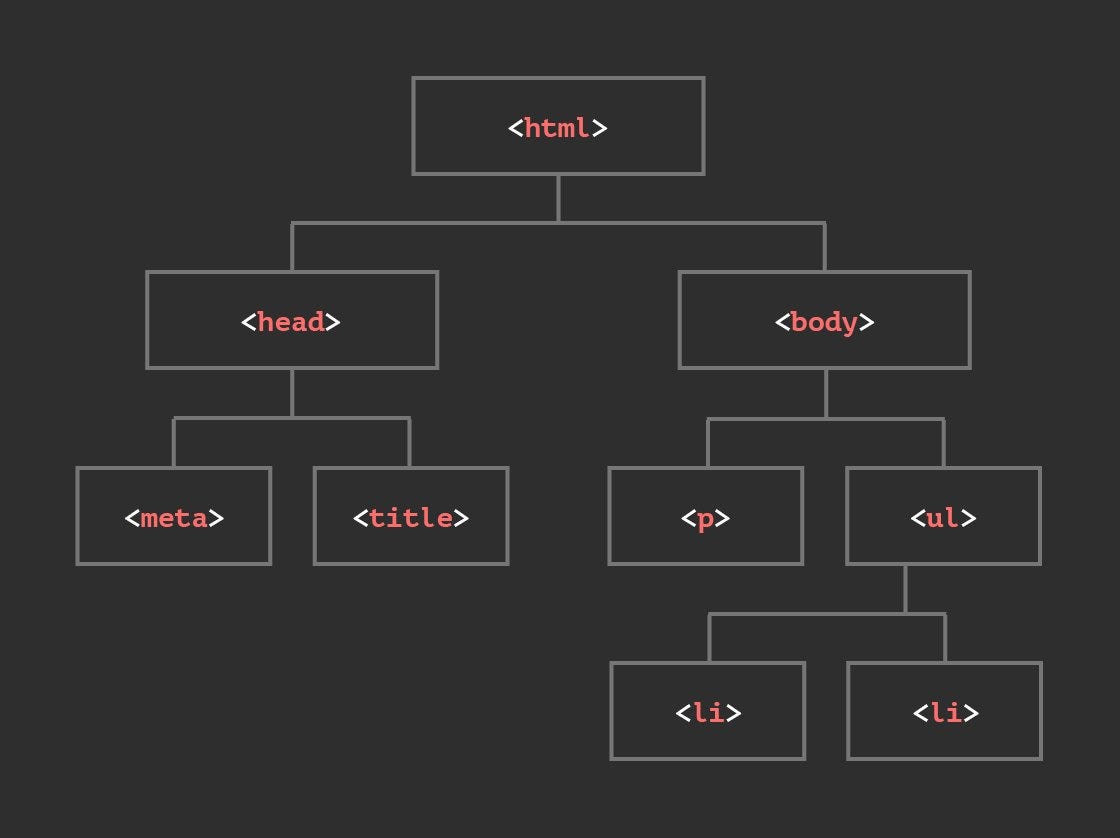
JavaScript allows manipulation of the Document Object Model (DOM) to dynamically modify HTML elements and their properties.
Selecting and Modifying Elements
// Selecting an element by its ID and changing its text content
const heading = document.getElementById("myHeading");
heading.textContent = "New Heading";

// Selecting elements by class name and modifying their styles
const paragraphs = document.getElementsByClassName("myParagraph");
for (let i = 0; i < paragraphs.length; i++) {
  paragraphs[i].style.color = "blue";
}
In this example, we select an element with the ID “myHeading” and change its text content. Then, we select elements with the class name “myParagraph” and modify their styles by changing their color.
Creating and Appending New Elements
// Creating a new paragraph element and appending it to an existing div
const newParagraph = document.createElement("p");
newParagraph.textContent = "This is a new paragraph.";
const existingDiv = document.getElementById("myDiv");
existingDiv.appendChild(newParagraph);
Here, we create a new element, set its text content, and then append it to an existing element with the ID “myDiv”.
Handling Events
// Adding an event listener to a button element
const myButton = document.getElementById("myButton");
myButton.addEventListener("click", function() {
  alert("Button clicked!");
});
In this example, we add an event listener to a button element with the ID “myButton”. When the button is clicked, an alert message saying “Button clicked!” will be displayed.
Traversing the DOM Tree
// Accessing child elements and modifying their properties
const parentElement = document.getElementById("parent");
const childElements = parentElement.children;
for (let i = 0; i < childElements.length; i++) {
  const child = childElements[i];
  child.textContent = "Modified";
}
Here, we select a parent element with the ID “parent” and access its child elements. We then loop through the child elements and modify their text content.
These are just a few examples of how you can manipulate the DOM using JavaScript. With DOM manipulation, you can dynamically update the content, appearance, and behavior of your web pages, enabling you to create interactive forms, responsive menus, animations, and much more. The DOM provides a powerful interface for JavaScript to interact with HTML elements and bring your web applications to life.
Event Handling
JavaScript enables event handling to respond to user interactions or other events on web pages.
Handling Form Submission
// Handling form submission event
const form = document.getElementById("myForm");
form.addEventListener("submit", function(event) {
  event.preventDefault(); // Prevent form submission
  const input = document.getElementById("myInput");
  console.log("Input value: " + input.value);
});
In this example, we handle the form submission event and prevent the default form submission behavior. We then access the input element and log its value to the console.
Handling Mouse Events
// Handling mouse over and mouse out events
const element = document.getElementById("myElement");
element.addEventListener("mouseover", function() {
  console.log("Mouse over!");
});

element.addEventListener("mouseout", function() {
  console.log("Mouse out!");
});
Here, we handle the mouse over and mouse out events on an element with the ID “myElement”. When the mouse cursor enters or leaves the element, the corresponding event handler functions are executed, logging messages to the console.
Handling Keyboard Events
// Handling keydown event
document.addEventListener("keydown", function(event) {
  console.log("Key pressed: " + event.key);
});
In this example, we handle the keydown event on the entire document. When any key is pressed, the event handler function logs the pressed key to the console.
Handling Window Resize Event
// Handling window resize event
window.addEventListener("resize", function() {
  console.log("Window resized!");
});
Here, we handle the window resize event. Whenever the user resizes the browser window, the event handler function is executed, logging a message to the console.
Event handling in JavaScript allows you to respond to user interactions and other events on web pages. By attaching event listeners to elements or the window, you can execute specific code or perform actions based on different events occurring in your web application. Feel free to explore more event types and experiment with different event handling scenarios to enhance your understanding of JavaScript event handling.
Error Handling
JavaScript provides control flow structures, such as if-else statements, switch statements, and loops, to control the flow of program execution. We’ll dive deep into these constructs and explore how to make decisions and repeat code based on specific conditions. Additionally, we’ll cover error handling techniques using try-catch blocks to gracefully handle exceptions and prevent program crashes.
JavaScript provides error handling mechanisms to catch and handle exceptions that may occur during program execution.
// Example of try-catch block for error handling
try {
  // Code that may throw an error
  throw new Error("Something went wrong!");
} catch (error) {
  console.error("An error occurred:", error);
}
Object-Oriented Programming
JavaScript supports object-oriented programming (OOP) concepts such as classes, objects, inheritance, and encapsulation. We’ll delve into creating classes, instantiating objects, defining methods, and utilizing prototypes. Understanding OOP in JavaScript will enable you to build modular and maintainable code.

JavaScript supports object-oriented programming concepts such as classes, objects, and inheritance.
// Example of class and object instantiation
class Person {
  constructor(name, age) {
    this.name = name;
    this.age = age;
  }

  greet() {
    console.log("Hello, my name is " + this.name);
  }
}

let person = new Person("John", 30);
person.greet();
Asynchronous Programming
Modern web applications often require fetching data from servers or making API calls. Asynchronous JavaScript allows us to perform these operations without blocking the user interface. We’ll explore callback functions, promises, and the newer async/await syntax for handling asynchronous operations effectively. You’ll learn how to make HTTP requests, process responses, and update the UI accordingly.
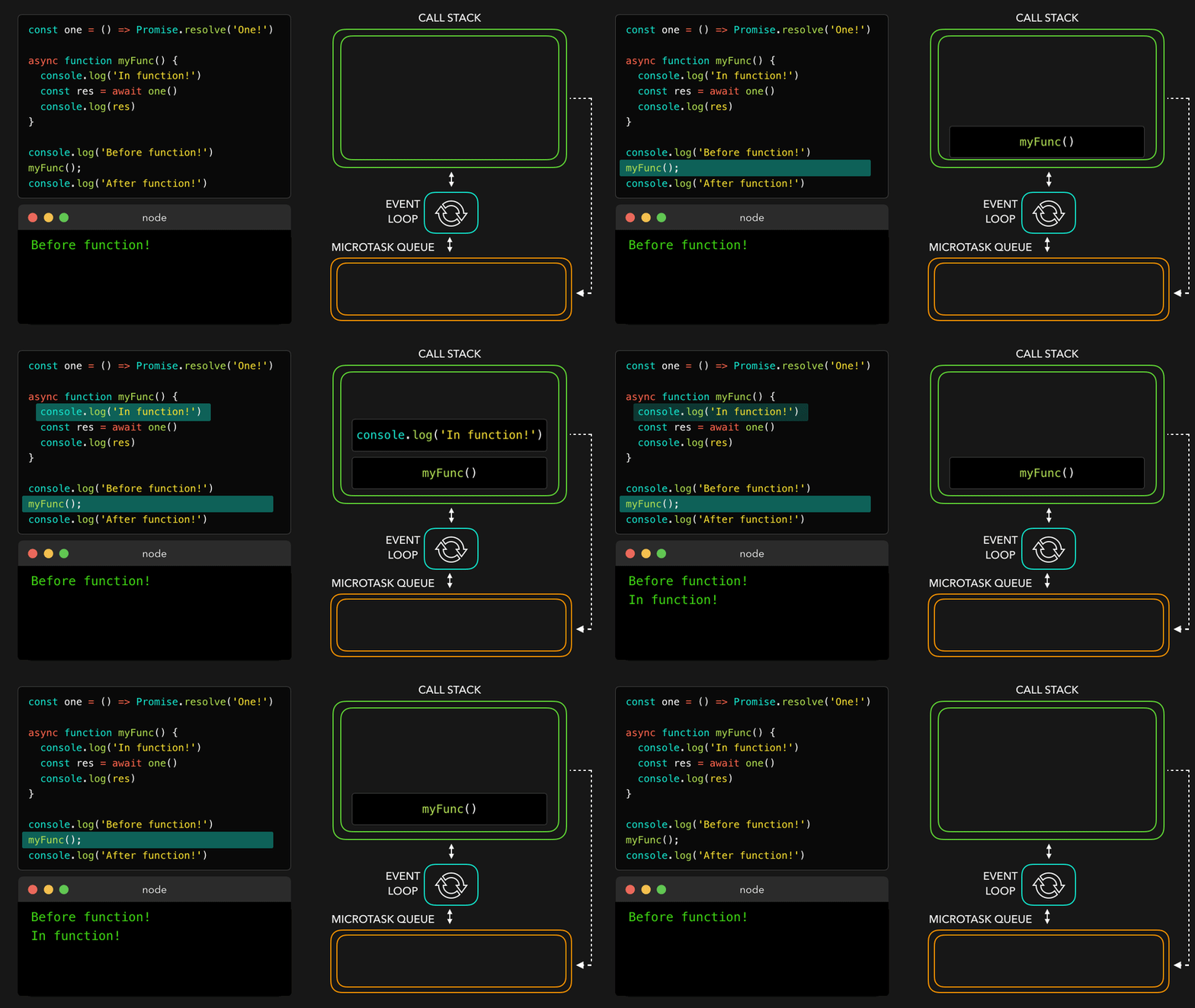
JavaScript allows asynchronous programming using promises and async/await syntax to handle operations that may take time, such as fetching data from an API.
// Example of asynchronous function using async/await
async function fetchData() {
  try {
    const response = await fetch('https://api.example.com/data');
    const data = await response.json();
    console.log(data);
  } catch (error) {
    console.error("Failed to fetch data:", error);
  }
}
Frameworks and Libraries
JavaScript has a vast ecosystem of libraries and frameworks that can significantly expedite web development. We’ll introduce you to popular frameworks such as React, Angular, and Vue.js. You’ll learn how to leverage these frameworks to create complex and scalable web applications.